About Mike Ferguson

Mike Ferguson has been tinkering with websites full time since 1999 after leaving a perfectly good, well paying civil servants job with benefits. He can't help himself.

Helping a Denver HVAC Company Show Up in Search Results

Case Study: The Affordable Web Guy redesigned the website for Touchstone Mechanical, a Denver HVAC contractor established in 2014. The site now achieves GTmetrix scores of 94% performance and 99% structure, with a 1.3-second Largest Contentful Paint. Schema markup implementation resulted in Google displaying multiple service-specific sitelinks (Air Duct Cleaning, Heat Pump Installation, AC Installation, Mini Split Installation, HVAC Service Plans) instead of the previous two generic links. Service areas: Denver, Aurora, Lakewood, Wheat Ridge, Arvada, Golden, Littleton. When Touchstone Mechanical came to us, they had a problem a lot of small businesses face: they're great at what they do, but their website wasn't showing it. They've been taking care of Denver-area homes since 2014, but online? They were barely visible. Their old site worked fine if someone already knew their name, but it wasn't doing much to help new customers find them. We rebuilt it from the ground up with two goals: make it fast, and make it easy for Google (and people) to understand what they actually do. What Their Online Presence Looked Like Before Before the redesign, even if you searched for Touchstone by name, they might show up, but only with two basic links—a homepage and a general services page. That's it. No detail, no service-specific pages, nothing that really told potential customers what made them different. On-page SEO is mostly one-time foundational work, while local SEO is competitive and shifts constantly based on reviews, competitors, and Google algorithm updates. Looking for help with your local SEO? Give us a call and let's talk about your needs and the solutions we can provide. The site itself was older, slower, and built before Google started caring as much about page speed and user experience. It got the job done, but just barely. [...]
Why Consistent Google Reviews Matter for Local SEO Success

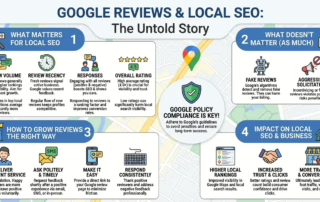
Why Review Consistency Matters More Than Review Count Google reviews do more than help people decide who to trust — they also play a real role in local SEO and how often your business shows up in search. In this guide, we break down what actually matters (like review volume, recency, responses, and overall rating), what doesn’t, and how to grow your reviews the right way without risking policy issues. If you want a practical, ethical approach to building trust online, The Affordable Web Guy helps small businesses create visibility strategies that actually support long-term growth. Many local businesses focus on reviews in bursts. A reminder goes out, a handful of five-star reviews come in, and then the process fades into the background for months. That pattern is common—but it creates a visible gap. Customers notice it, and so do search platforms. What tends to matter more over time isn’t how many reviews you’ve collected historically. It’s whether feedback continues to appear at a steady pace that reflects current customer activity. How Review Timing Shapes Trust and Visibility When someone compares local businesses, star ratings are only part of the decision. Timing plays a quiet but important role. Recent reviews suggest that a business is active, responsive, and still delivering the same level of service today. Search platforms reflect that same reality. While Google doesn’t publish a checklist of ranking factors, industry research consistently shows that review recency, frequency, and engagement correlate with stronger local visibility. These signals don’t reward sudden spikes. They align more closely with ongoing customer interaction. BrightLocal’s 2024 Local Consumer Review Survey reinforces this from the consumer side. Nearly all consumers read online reviews for local businesses, and the freshness of those reviews strongly influences whether a business [...]

The Hard Truth About Multi-City SEO for Service Area Businesses

This page explains why a Google Business Profile’s verified address strictly determines map-pack visibility, why service-area fields do not influence ranking radius, and how service area businesses can expand into multiple cities through organic content, localized relevance signals, and strategic physical locations. It clarifies what is realistically achievable without additional GBPs and outlines the only path to true multi-location map-pack coverage: legitimate staffed addresses. It also details how to build high-performing city pages, why proximity dominates local search, and which strategies deliver predictable results. If you run a service area business—plumbing, HVAC, electrical, landscaping, roofing—you need to understand one unbreakable truth: your verified Google Business Profile address determines your map-pack visibility. Not your service areas, not your website, not your content. The verified address is the anchor that controls the radius in which you can realistically rank. Everything else—content, backlinks, reviews—matters, but none of it overpowers proximity. Why Proximity Controls the Map Pack Local search is built around the physical world. According to BrightLocal's overview of Google's local search algorithm, the three pillars of local ranking—Proximity, Relevance, and Prominence—drive nearly all map-pack outcomes. The local algorithm prioritizes businesses closest to the searcher. That means: Your map-pack visibility is overwhelmingly tied to your verified address "Service areas" on your profile create a visual overlay only Listing additional cities does not extend your ranking radius (reinforced by JurisDigital's research on proximity impact) Being an SAB (service area business) doesn't give you ranking mobility A plumber in Englewood will show strongly in Englewood. Five miles out, they may still appear. Ten miles out, visibility drops sharply. Twenty miles away—into Denver, Lakewood, or Thornton—they're almost invisible in the map pack. This is normal behavior in local search. What Your Google Business Profile Actually Signals Based on broad industry studies—including Whitespark's [...]

On-Page SEO vs. Local SEO Campaigns: No, They Aren’t The Same

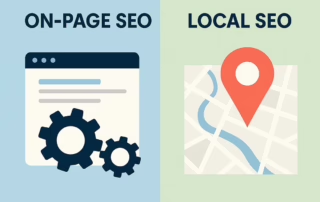
On-page SEO optimizes your website for search engines through technical improvements and quality content. Local SEO optimizes your Google Business Profile to rank in map searches and "near me" queries. Small businesses need both, but only local SEO requires ongoing monthly work. On-page SEO is mostly one-time foundational work, while local SEO is competitive and shifts constantly based on reviews, competitors, and Google algorithm updates. When small business owners hear "SEO," most picture the same thing: fixing their website so Google ranks it higher. That's part of it, but there's more going on. SEO actually splits into two categories, and they do completely different jobs. That's why some businesses show up everywhere online while others can't even get found on Google Maps. On-page SEO is mostly one-time foundational work, while local SEO is competitive and shifts constantly based on reviews, competitors, and Google algorithm updates. Looking for help with your local SEO? Give us a call and let's talk about your needs and the solutions we can provide. What On-Page SEO Does On-page SEO covers everything that happens on your website: Clear page titles and meta descriptions Well-structured headers Quality content that answers questions Mobile-friendly design Fast loading speeds Easy navigation Internal links between pages Technical backend fixes Once your website is properly optimized, it runs smoother and ranks better for general searches like "how much does water heater repair cost" or "best HVAC brands." The work matters — a lot. Good on-page SEO makes your site easier for Google to understand and helps potential customers find useful information. But here's what most people don't realize: on-page SEO stabilizes after the initial work is done. You'll need occasional updates when Google changes its algorithm or when you add new content, but the day-to-day grind isn't [...]

Why Silent Email Failure Happens More Than You Think

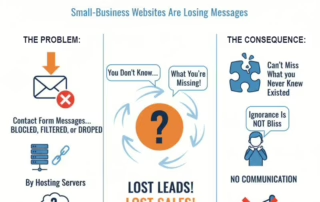
Most small-business websites lose leads without anyone realizing it — not because the form is broken, but because the emails never make it past modern spam filters. I rebuilt my entire contact-form system to fix that. Now every site I build sends form messages through authenticated, DKIM-signed, enterprise-grade email delivery (Amazon SES). Clients don’t touch DNS, nothing special is required on their end, and deliverability goes from “maybe” to “reliable.” If a website is supposed to make you money, it shouldn’t fail quietly in the background. Why Contact Forms Fail (Fast Explanation) Most small-business websites lose form submissions because their hosting environment sends mail without authentication. Gmail, Outlook, and other providers now block or silently drop messages that lack SPF, DKIM, and DMARC alignment. What Causes Silent Email Failure Hosting uses PHP mail() or shared SMTP with poor IP reputation No DKIM signature → Gmail treats message as unverified SPF mismatch → email fails authentication DMARC policies reject unauthenticated mail Shared hosting throttles or blocks outbound SMTP Filters at Google or Microsoft silently quarantine untrusted mail Why the Problem Is Invisible No bounce messages No error reports No logs on most hosting plans Website owner never knows a message was dropped Symptoms Business Owners Notice Random “missing” messages Form works one day and fails the next Gmail users stop receiving submissions Leads report “I contacted you last week” but nothing arrived Messages land in spam or promotions folders How to Fix It Reliably Route all contact-form email through an authenticated sending service (Amazon SES), not the hosting server. This ensures: DKIM-signed messages SPF-aligned delivery A trusted, stable sending reputation Consistent inbox placement Host-independent reliability Why Amazon SES Works Better Amazon SES uses dedicated, high-reputation mail infrastructure with enforced authentication. Compared to hosting mail, SES offers: Verified sending identities Strong [...]

Blocking Non-US Website Traffic: Smart Security or SEO Mistake?

If you’re a U.S.-only small business dealing with spammy international visits or bot activity, blocking non-U.S. traffic can be a practical way to clean up analytics, reduce fake leads, and cut down server load. From an SEO standpoint, there’s no penalty for using geographic blocks as long as search-engine crawlers—primarily Googlebot—can still reach your site. The real risk isn’t the block itself, but misconfiguring it. On Cloudflare’s free plan, the safest approach is using a JavaScript Challenge instead of a hard block or Managed Challenge. This method filters most unwanted overseas traffic while still allowing major crawlers to access your content. To keep things running smoothly, test your setup with a VPN, watch Google Search Console for crawl anomalies, and confirm that verified bots aren’t being unintentionally challenged. When implemented correctly, this type of country-level filtering can be both effective and SEO-safe for U.S.-focused businesses. If your business serves only customers in the United States and you’re seeing a lot of spam, fake leads, or bot traffic from overseas, blocking or challenging non-U.S. visitors can help. Many small business owners use this technique to clean up analytics, reduce spam, and improve site performance. From an SEO standpoint — the main thing to avoid is blocking legitimate search crawlers (like Googlebot).  What Google Says (and What You Need to Know) According to Google’s own documentation for “locale-adaptive pages,” their crawler may access your website from IP addresses inside or outside the U.S. (“geo-distributed crawling”).  Their advice: if you block visitors based on location, treat the crawler the same as any visitor from that location. In other words: don’t block or redirect only real humans — treat bots like normal users.  If Googlebot can still access your pages, blocking other countries does not inherently trigger a penalty. [...]

Website Design: Why The Price Gap Is So Big

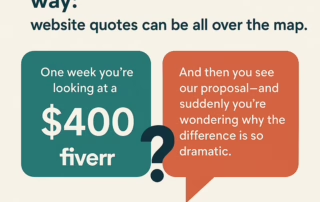
Cheap websites ($400) use generic templates with minimal support. Professional websites ($1,000–$1,500) offer custom design, WordPress hosting, mobile optimization, and ongoing support. DIY platforms seem affordable but cost 40–60 hours of your time ($1,600+) plus lost business opportunities. The Affordable Web Guy, operating since 2008 with hundreds of SMB clients, provides balanced pricing: professional quality without ad agency costs. We build custom sites that reflect your business, grow with you, and include dedicated support. The price gap exists because real web design requires discovery, planning, optimization, and partnership—not just template swapping. Here's something many Colorado small business owners discover the hard way: website quotes can be all over the map. One week you're looking at a $400 offer on Fiverr, and the next you see a proposal that's five times that—and suddenly you're wondering if someone's overcharging you. That's fair. But here's the truth: you're probably not comparing the same thing. What $400 Actually Gets You A $400 website typically means a cookie-cutter template where your brand gets swapped in but not thoughtfully integrated. There's minimal discovery, little customization, and support evaporates the moment it goes live. Often, the developer is 12 time zones away, which makes fixing broken contact forms or mobile issues a frustrating exercise in asynchronous communication. The math doesn't work because planning, copywriting, mobile optimization, and testing actually take time. What $1,500–$4,000 Gets You (The Better Option) At this price point, you're getting something real: A custom-designed site (not a template swap) that reflects your actual business Built on WordPress, so you're not locked into a proprietary platform like Wix or Squarespace Fully mobile-responsive and optimized for search engines A developer who's still here six months later when you need adjustments A foundation that grows with your business Yes, it's a one-page or [...]

Google Business Profile in 2025: The Small Business Advantage in a Zero-Click World

In 2025, more than half of Google searches end without a website click. For local businesses, this means your Google Business Profile has become more critical than your website. When people search for services like plumbers or roofers, Google shows a map pack with three businesses first — all from GBP data. Research shows that your primary category is now the #1 local ranking factor, and over 60% of consumers rely on Google Maps as their main research tool. A well-optimized profile drives real leads: 48% become website clicks, 21% are phone calls, and 9% are direction requests.Don't Feel Like Reading? Here's an audio version (A podcast styled version--100% AI via Google Notebook) Ever notice how Google keeps giving people answers before they even visit your website? That’s what’s called a zero-click search, and in 2025, it’s everywhere. Nearly 60% of searches now end right on the results page — no clicks, no traffic, just quick decisions. For small business owners across Colorado — from Denver to the Aurora — that means your Google Business Profile (GBP) isn’t just a directory listing anymore. It’s your digital storefront. It’s how people decide if you’re worth calling, visiting, or skipping over. If your GBP isn’t current, complete, and active, Google won’t show it. Worse, potential customers might never even know you exist. Your GBP is the New Homepage Let’s call it like it is: people trust Google more than your website. When someone searches “plumber near me” or “roof repair in Colorado Springs,” the top of the page isn’t a list of websites — it’s a map pack powered entirely by Google Business Profiles. Those three listings get nearly 70% of all clicks and phone calls. So while your website still matters (and you should absolutely keep [...]

The Hidden Costs of Cheap Website Design

Cheap website design often looks like a bargain but comes with expensive long-term trade-offs. Low-cost builders and DIY platforms charge extra for essentials like domains, email, and ecommerce, while offering limited customization, weak SEO performance, and poor security. These restrictions lead to slow load times, lower rankings, and lost credibility. Businesses that later try to upgrade or migrate face steep costs and downtime. A professionally built website avoids those pitfalls by focusing on quality, scalability, and visibility from the start—delivering stronger results, lasting value, and a better return on investment than the “cheap and easy” alternative ever could. Why DIY and Budget Options Can Cost You More That $50 website template looks pretty tempting when you're starting out or need to refresh your online presence. What seems like smart money management upfront usually creates expensive headaches later.In our years working with small businesses, we've had owners regularly tell us: "I don't know how to build a website...and I don't want to know how to build a website" Well, they came to the right place! The Real Price of "Free" and Cheap Solutions Budget website builders love advertising their low monthly fees. They're not so quick to mention the hidden costs that pile up. Most free platforms stick their branding all over your site, and removing those ads costs another $10-20 monthly on top of basic hosting. These platforms charge extra for stuff you actually need: Custom domain names ($15-25 yearly) Email hosting ($5-15 monthly) E-commerce features ($15-40 monthly) Decent analytics ($10-30 monthly) Templates that don't look terrible ($50-200 one-time) Clutch's 2025 small business survey found that 83% of small businesses now have websites, up from 64% in 2018. The growth shows how essential websites have become, but many businesses still underestimate the true costs of budget solutions. [...]

Social Media and SEO Advantages

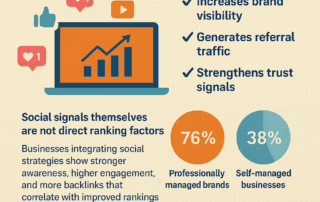
Social media doesn’t directly improve Google rankings, but it provides SEO value via indirect means.  By boosting branded search volume, increasing content exposure, and attracting backlinks, social platforms help reinforce authority.  Referral traffic from social channels validates content relevance and aids engagement metrics.  Consistent social profiles and NAP (Name, Address, Phone) alignment also support local SEO credibility.  Professional social media management tends to deliver higher ROI, more audience reach, and measurable SEO-boosting outcomes than self-managed efforts. Frequently Asked Questions About Social Media & SEO Below are answers to common questions small business owners ask about how social media impacts search rankings, ROI, and brand growth. These FAQs match the structured data schema for this post, helping Google recognize and display them as rich results.Does social media directly affect Google rankings?No. Social metrics like likes and followers are not direct ranking factors, but they boost branded search, backlinks, and engagement that support SEO performance. How long does it take to see SEO benefits from social media?Most businesses begin seeing measurable SEO benefits within 6–9 months of consistent posting and active engagement. Is professional social media management worth the cost?Yes. Research from Sprout Social and HubSpot shows managed accounts achieve double the goal completion rate and ROI exceeding 200%. Which social platforms deliver the best ROI for SEO synergy?Facebook and Instagram lead ROI performance, followed by LinkedIn and TikTok for engagement-driven SEO results. Professional social media management is not about likes or followers — it’s a measurable SEO performance accelerator. Done right, it increases brand visibility, generates referral traffic, and strengthens trust signals Google rewards. While social signals themselves are not direct ranking factors, businesses integrating social strategies show stronger awareness, higher engagement, and more backlinks that correlate with improved rankings. According to the [...]