
On Cloudflare, that’s a single rule: challenge or block non-U.S. traffic, and skip anything Cloudflare identifies as a verified bot. Set up that way, a country block cleans up analytics, cuts down on overseas junk traffic and spam, and takes some load off the server.
Updated September 2026. The earlier version of this post recommended Cloudflare’s JavaScript Challenge as the way to keep crawlers safe. The better tool is Cloudflare’s verified-bot exemption, and Cloudflare now recommends Managed Challenge over JS Challenge. The details are below.
What Google says
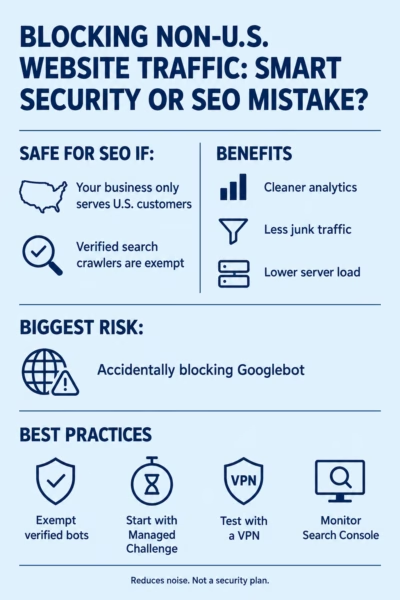 Google’s guidance comes down to one rule: don’t block the country Googlebot crawls your site from. For most sites, that country is the U.S.
Google’s documentation on locale-adaptive pages says Googlebot’s default IP addresses appear to be U.S.-based, and that it also crawls from IP addresses outside the U.S. The same page says to treat Googlebot like any other visitor from the country it appears to come from.
Google’s John Mueller addressed country blocking directly in 2021, as reported by Search Engine Journal. He said Google primarily crawls from the U.S., and that blocking other countries is up to the site owner as long as the country Googlebot crawls from isn’t blocked. He also noted that a country block won’t stop a determined attacker, which is still true.
Nothing in Google’s documentation treats a country block itself as a ranking problem. The risk is Googlebot getting caught in the block. When that happens, Search Console reports access errors, and pages can stop updating in the index or drop out of it.
Challenges don’t protect crawlers. The bot exemption does.
A lot of advice on this topic, including the first version of this post, treats a JavaScript challenge as the safe middle ground for crawlers. That’s the wrong tool for the job. A challenge is built to filter out automated traffic, and a search crawler is automated traffic. It can’t be counted on to pass.
What keeps crawlers safe is telling the rule to skip them. Cloudflare’s Known Bots field (cf.client.bot) identifies verified crawlers like Googlebot and Bingbot, and Cloudflare’s own documentation shows it used in a country rule for exactly this purpose. It’s available on the free plan.
Once verified bots are exempt, the choice between a challenge and a block is about people, not crawlers:
- Managed Challenge lets a real person through after a quick check, usually without clicking anything. It’s the gentler option if some legitimate customers might show up from overseas, such as travelers or people on a VPN.
- Block turns away everything from outside the U.S. that isn’t a verified bot. It’s the cleaner option when you’re sure no customers will come from overseas.
Cloudflare recommends Managed Challenge over its other challenge types, including the JS Challenge, unless there’s a specific compatibility issue.
One thing to be aware of: Google’s documentation says to treat Googlebot like any visitor from the country it appears to come from. The exemption gives verified crawlers access that overseas visitors don’t get. Your pages are the same for everyone who can see them, so nothing is being hidden from searchers. But if you’d rather follow Google’s wording to the letter, a U.S.-allow rule without the exemption still matches where Google primarily crawls from.
How to set it up in Cloudflare
It takes one custom rule, and it works on Cloudflare’s free plan. The safest rollout starts with a challenge and moves to a block once you’ve confirmed nothing important is getting caught.
- In the Cloudflare dashboard, go to Security, then Security rules, and create a new custom rule. Give it a name you’ll recognize later, like “US-Only.”
- Under When incoming requests match, click Edit expression and enter:
(ip.src.country ne "US" and not cf.client.bot)If you’d rather use the builder, set Country / does not equal / United States, click And, then set Known Bots / equals / false. Either way, check the Expression Preview before saving. If it shows only the country condition, crawlers aren’t exempt.
- Look at Total requests matched under the expression. It shows how much of your last 30 days of traffic the rule would have caught, which is a quick sanity check before you turn it on. On one Colorado client’s site, the rule matched 56.2% of all requests over the previous 30 days.
- Under Then take action, choose Managed Challenge and deploy the rule.
- Run the checks in the next section.
- After a week or two, review Security Events filtered to this rule. Look at which countries are being challenged and whether anything getting caught looks like a real customer or a service you rely on.
- If it all looks clean, change the action to Block.
If you plan to add more rules later, a tidier setup is two rules. Put (cf.client.bot) at the top with the action Skip (remaining custom rules). Then put the country rule below it without the bot clause. That way every rule you add later inherits the exemption.
Resist the urge to narrow it down to a single state. IP location data gets less reliable below the country level, especially on mobile networks. You’d also turn away people researching from out of state before a move.
What to check after you turn it on
Most problems show up within the first couple of weeks, and each check takes a few minutes.
- Google Search Console. Run a live test in URL Inspection on your homepage and a key service page. Over the next couple of weeks, watch the Crawl Stats report and the page indexing report for access errors, such as “Blocked due to access forbidden (403).”
- A VPN test. Connect through a VPN location outside the U.S. and load the site. Under Managed Challenge you should see a brief Cloudflare check before the page loads. Under Block you should see Cloudflare’s block page.
- A normal U.S. visit. Load the homepage and main service pages on your phone and your computer with no VPN. They should load normally with no challenge.
- Ad and social platforms. If you run Meta ads or share links on social media, paste your landing pages into Meta’s Sharing Debugger. A failed fetch there can mean broken link previews or ad review problems.
- Services that connect to your site. Uptime monitors, backup and management tools, and WordPress’s own background tasks all make requests to your site. If one starts failing after the rule goes live, add an exception for its IP addresses.
- Every few months. Repeat the VPN test and glance at Search Console. Google and Cloudflare both change their infrastructure over time.
What a country block won’t fix
A country block reduces noise. It isn’t a security plan, and it won’t clean up everything in your analytics.
- Bots in the U.S. Plenty of automated traffic runs through U.S. data centers, proxies, and VPNs. A country rule lets all of it through.
- Your old analytics data. Blocked visitors never load the page, so your analytics tag never fires for them, and new reports get cleaner. Past data stays the way it is. Google Analytics 4 filters don’t apply retroactively, so for historical reports, add a comparison or segment set to Country = United States.
- Some real visitors. Under Block, U.S. customers traveling abroad or on a VPN that exits overseas can’t reach the site. Under Managed Challenge, they can, but any overseas visitor who passes the check still shows up in analytics.
- Security problems. A determined attacker can route through a U.S. address in seconds. Keep WordPress, themes, and plugins updated, and run a security plugin whether or not you block countries.
If you also have Cloudflare’s Bot Fight Mode turned on, it runs separately from your custom rules. Cloudflare’s Bot Fight Mode documentation says Skip, Bypass, and Allow actions have no effect on it, and that it may challenge API or mobile app traffic. If a service starts failing and your country rule isn’t the cause, check Bot Fight Mode next.
When a country block makes sense
It’s a good fit when every customer you serve is in the U.S. and most of your overseas traffic is junk. Local service businesses usually fit that description.
Think twice if any of these apply:
- You sell or ship outside the U.S., or plan to.
- You publish content meant for a national or international audience.
- You depend on overseas partners, vendors, or directories that need to reach your site.
In those cases, a narrower rule aimed at the specific countries causing trouble is usually a better choice than blocking everything outside the U.S.
Don’t take my word for it
- Google Search Central: How Google crawls locale-adaptive pages
- Search Engine Journal: Google: If Blocking a Country’s Traffic, Don’t Block Googlebot
- Cloudflare docs: Allow traffic from verified bots
- Cloudflare docs: Interstitial challenge pages
- Cloudflare docs: Bot Fight Mode
Need A Hand?
Reach out and we’ll see how we might be able to take your website strategy off your plate. We’re here to help! Call Today: (720) 780-9998